2026 Best Network Cable for Home and Business?
Choosing the best network cable for home or business starts with the devices, distance, and speed you actually need. A network cable connects routers, computers, access points, cameras, and other wired equipment, but not every cable suits every installation. For a home office, Cat6 may provide a practical balance of performance and cost. Cat6A can make more sense for longer runs, busier workspaces, or installations planned to last for years. Yet a higher category label alone does not guarantee better results.
Look beyond the packaging. Check the cable’s rated performance, conductor material, jacket type, and compatibility with your equipment. Solid copper is generally the dependable choice for permanent wiring and Power over Ethernet; copper-clad aluminum is not an equivalent substitute. For outdoor paths or tight spaces, confirm the jacket is rated for that location. Shielding can help in electrically noisy environments, but it must be installed correctly. Small details matter. A cable that is too long, poorly terminated, or bent sharply can undermine a carefully chosen network setup.
This guide compares common cable types and explains where each one fits in a real home or business. It also covers speed claims, installation choices, and mistakes that are easy to overlook. Manufacturer specifications and recognized testing standards are useful checks, though product listings can still be unclear. The right choice is rarely the most expensive cable. It is the one that meets your current needs, leaves sensible room for growth, and performs reliably after installation.
What Network Cables Are and How They Work
A network cable carries data between devices, such as a laptop, router, printer, or office switch. Common Ethernet cables contain pairs of copper wires twisted together. These twists help reduce interference from nearby electrical signals. The cable’s connector links each wire to a network port, where devices send and receive data as electrical signals. Cable categories describe tested performance, but actual speeds also depend on the connected equipment and installation.
Tips: Match the cable to the job. For a short home connection, a suitable copper Ethernet cable is often practical. Keep it away from power cords when possible, and avoid sharp bends or crushed sections. Check that connectors click securely into their ports.
A cable does not create internet access by itself. It provides a physical path for data across a local network, while a modem or router connects that network to an internet service. Longer runs and busy environments may need more careful planning. Fiber-optic cables carry data as light and can suit longer distances, but require compatible ports. One easy mistake is choosing by category label alone; the route, devices, and installation quality matter too. Even a well-rated cable can disappoint if a connector is damaged or the run is poorly placed.
Which Cable Categories Suit Home and Business Networks
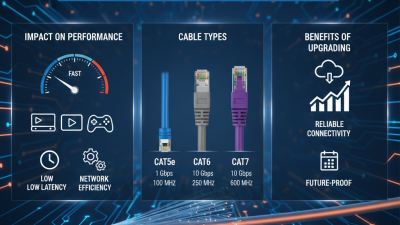
For most homes, Cat5e supports gigabit networking over runs up to 100 meters. It suits streaming, video calls, and everyday connected devices. Cat6 offers more headroom for faster local transfers and can support 10-gigabit links over shorter distances, depending on installation conditions. Keep it simple. A larger cable category will not make an internet plan faster by itself.
Small businesses often benefit from Cat6, especially where staff share files or use networked printers and access points. For new offices with demanding workloads, Cat6A supports 10-gigabit Ethernet up to 100 meters and handles future upgrades well. Distance matters. Planning cable routes before walls are closed can prevent awkward, costly changes later. For Power over Ethernet devices, check that the cable and installation suit the equipment’s power requirements.
Choose solid-copper cable for permanent in-wall runs, and verify its category markings and specifications. Shielded cable is not automatically better; it needs appropriate grounding and careful installation. I would not automatically select the highest category for every room. It costs more, can be thicker, and may be harder to route. In practice, the right choice depends on link length, equipment, interference, and upgrade plans—not the category number alone.
How Cable Types Differ in Speed, Distance, and Shielding
A cable’s category sets the practical ceiling, but the installed link matters just as much. IEEE 802.3bz specifies 2.5 and 5 Gigabit Ethernet over Category 5e or Category 6 cabling for channels up to 100 meters. That suits many home offices, where a router, wall jack, and desk may span only a few rooms. Keep the run neat. Tight bends and poor terminations can undermine performance.
For 10 Gigabit Ethernet, distance becomes more important. IEEE 802.3an supports 10GBASE-T across 100 meters of Category 6A cabling. Category 6 may support it for shorter runs, often up to 55 meters, depending on installation conditions and interference. ANSI/TIA-568.2-D defines balanced twisted-pair cabling requirements, but a category label alone cannot verify a finished link. I would test long runs before closing walls. That step is easy to skip.
Shielded cable can help in electrically noisy spaces, such as near motors or dense equipment racks. It does not automatically make a link faster. ANSI/TIA-568.2-D installation guidance emphasizes correct shield continuity and bonding; poorly installed shielding may offer little benefit. For a quiet home, unshielded cable is often simpler to terminate. For a business rack, check the route, grounding plan, and equipment connections first. A small detail, but important.
How to Match a Cable to Your Network Requirements
Choosing a network cable starts with the devices, speed, and distance you actually need. Check the network ports on your router, computer, and access points; a faster cable cannot make a slower port run faster. For many homes, Cat5e supports gigabit connections over runs up to 100 meters. Cat6 offers more headroom, while Cat6A can support 10-gigabit links up to 100 meters when installed correctly.
Distance matters. A Cat6 run may support 10 gigabits over shorter distances, but the result depends on cable quality and installation conditions. For long runs between buildings, or routes near electrical equipment, fiber may be a better fit because it resists electromagnetic interference. It also needs compatible ports or conversion hardware. Check this before purchasing.
Look at the route, too. Tight bends, crushed sections, and poor terminations can undermine performance, even with a high-rated cable. For powered devices such as cameras or access points, confirm the cable’s conductor material and suitability for the required PoE load. Solid copper is generally preferred for permanent runs; avoid assuming every cable marked “Cat6” is built alike. It is easy to overbuy. A modest cable that matches the ports and distance may serve better than an expensive upgrade. Still, plans change, and a cable route can be difficult to replace later. A little spare capacity is sensible.
What to Check Before Buying and Installing Network Cable
2026 Best Network Cable for Home and Business?
What to Check Before Buying and Installing Network Cable
The right cable depends on your network speed, cable run, and installation space. Cat5e can support gigabit connections in many homes, while Cat6 offers more capacity for upgrades. For standard Ethernet, the complete channel should stay within 100 meters, including patch cables. Measure the route, not just the distance between devices. A cable may need to travel around doorways or through a closet.
Tips: Check the cable’s printed category and length before installation. Keep it away from power cables where practical. Avoid tight bends and crushing it under furniture. Small details matter.
For walls, ceilings, or outdoor runs, check that the cable jacket is rated for that location. Solid conductors suit fixed runs; stranded cables are more flexible for short patch connections. Shielded cable is not automatically better: it needs compatible equipment and proper grounding to help reduce interference. I’ve seen people buy higher-rated cable, then overlook the router or switch. That part is easy to forget. Check your network ports and expected devices, and leave a little extra cable for careful routing. Avoid stretching it tightly; a neat installation is useful, but perfect cable management is not worth damaging the run.