What is the Best Network Patch Panel for Your Needs?
When it comes to setting up a reliable network, choosing the right network patch panel is crucial. John Smith, a networking expert with over 15 years of industry experience, once said, "Selecting the right patch panel can make all the difference in your network's performance." His insight highlights the importance of understanding your needs.
A network patch panel acts as a central point where all network cables connect. It helps organize and manage numerous connections, ensuring smooth data flow. However, not all patch panels are created equal. Each type has unique features and specifications designed for different environments.
Understanding your specific requirements will lead you to the best option. It is not uncommon for professionals to feel overwhelmed by the variety available. Choosing the wrong network patch panel can create bottlenecks and cause frustrations. Thus, it's essential to do your homework before making this vital decision.

Understanding Network Patch Panels and Their Purpose
Network patch panels are essential components in modern networking. They organize and manage your network's cabling efficiently. By allowing multiple connections to a central point, patch panels simplify maintenance and troubleshooting.
A patch panel acts as a hub, connecting incoming and outgoing cables. The proper use of a patch panel reduces clutter and enhances airflow in data centers. Additionally, it allows for easier rerouting if changes occur in your network setup. A well-organized patch panel can improve both the look and function of your network space.
**Tip:** Always label your cables clearly. This helps in identifying connections and reduces confusion during maintenance.
When choosing a patch panel, consider the number of ports you need. Selecting a panel with extra ports can accommodate future growth. Avoid overloading your panel, as this can lead to signal degradation.
**Tip:** Regularly check connections for wear and tear. Keeping your hardware in good condition ensures optimal performance over time. Be mindful of dusty environments, as dust can impact connectivity.
Types of Network Patch Panels: A Comprehensive Overview
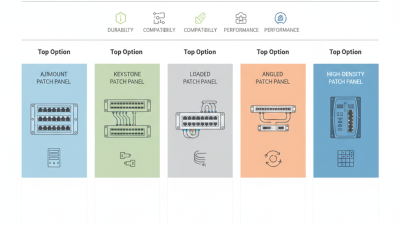
When considering network patch panels, understanding the types available is crucial. There are typically three main categories: modular, fixed, and shielded panels. Modular panels allow customization by mixing and matching port types. Fixed panels are straightforward, with a set number of ports, making installation easier. Shielded panels, however, provide additional protection against electromagnetic interference, crucial in densely populated network environments.
According to a recent industry report, shielded patch panels can decrease signal degradation by up to 50%. This is especially beneficial in data centers or offices with high-frequency equipment. A standard patch panel typically supports up to 24 ports, which can accommodate the needs of small to medium businesses. However, as your network grows, investing in modular panels may provide the flexibility required for future expansions.
Tips: Always assess your current and future networking needs. Planning can save costs in the long run. Periodic reviews of your infrastructure are also essential. Even well-installed panels can suffer from wear over time. Ensure regular maintenance to keep your network functioning smoothly.
What is the Best Network Patch Panel for Your Needs? - Types of Network Patch Panels: A Comprehensive Overview
| Type of Patch Panel |
Port Count |
Mounting Type |
Cable Type |
Material |
Typical Use Case |
| Unshielded Twisted Pair (UTP) Patch Panel |
24 |
Rack-Mount |
Cat 5e, Cat 6 |
Steel |
Office Networks |
| Shielded Twisted Pair (STP) Patch Panel |
48 |
Rack-Mount |
Cat 6, Cat 6a |
Aluminum |
Data Centers |
| Fiber Optic Patch Panel |
12 |
Wall-Mount |
Single-Mode, Multi-Mode |
Plastic |
High-speed Internet |
| High-Density Patch Panel |
96 |
Rack-Mount |
Cat 6, Cat 6a |
Steel |
Large Enterprises |
| Modular Patch Panel |
Varies |
Rack-Mount |
Flexible (Customizable) |
Steel or Plastic |
Tailored Solutions |
Key Features to Consider When Choosing a Patch Panel
When selecting a network patch panel, several key features should be prioritized. The type of ports, for instance, plays a crucial role. A common choice is the 24-port panel, ideal for small to medium-sized networks. However, larger networks may require 48 ports or even more. Understanding your current and future needs is critical here. The wrong choice can lead to inadequate growth support.
Another important factor is the material and design of the patch panel. High-quality metal housings tend to offer better durability and heat dissipation. A report from the Fiber Optic Association (FOA) highlights that panels with proper airflow can significantly enhance network performance. Moreover, consider the ease of installation and management. Removable cable management systems are highly beneficial for organizational purposes.
On the technical side, features like CAT6 and CAT6A compatibility have become standard. These support higher data rates and are essential for modern applications. However, think beyond just speed; ensure that grounding and shielded options are available. A survey conducted by the Telecommunications Industry Association (TIA) noted that poor grounding often leads to connectivity issues. Make informed choices to avoid these pitfalls.
Assessing Your Network Needs: How to Select the Right Patch Panel
When selecting the right patch panel for your network, it's essential to assess your specific needs. Start by considering the scale of your network. For small offices, a simple
24-port patch panel might suffice. In contrast, larger setups may require 48-port options or higher.
According to a report by the International Data Corporation (IDC), organizations are increasingly adopting 10GbE technology, which can demand more robust patch panel configurations.
Next, think about your cabling standards. With the rise of Ethernet speeds and the growing use of fiber optics, compatibility is critical. The Telecommunications Industry Association (TIA) states
that proper matching of patch panels to cable categories enhances network performance. Invest in a panel that can support the future growth of your infrastructure.
Another consideration is ease of management. A poorly organized patch panel can lead to inefficiencies. Industry experts recommend using
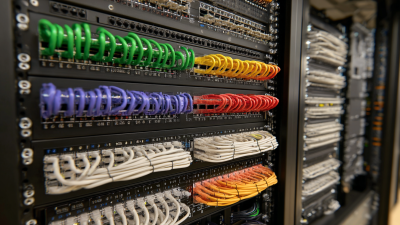
color-coded cables for straightforward identification. Yet, this doesn't guarantee a flawless setup. Regular inspections are necessary to tackle potential issues like
signal loss or interference. Each network environment has its unique challenges, requiring constant adaptation and proactive maintenance.
Installation and Maintenance Tips for Your Patch Panel
When it comes to installing a network patch panel, careful planning is essential. Start by assessing your space requirements. Ensure your panel can fit in the allocated area without compromising airflow. A crowded setup can lead to overheating, impacting performance. Consider the length of your cables. Shorter cables reduce clutter and improve signal quality.
Tips for installation include labeling your cables clearly. This practice saves time during troubleshooting or maintenance. Avoid tangling cables; use cable ties to keep things organized. Regularly check connections to ensure they remain secure. Loose connections can lead to intermittent service.
Maintenance is as crucial as installation. Dust and debris can accumulate in your patch panel. Regular cleaning can extend its life and keep performance consistent. Revisit your setup periodically. Technology evolves quickly, and so do your network needs. What worked yesterday may not work tomorrow. Adaptability is key in maintaining an efficient network.