Choosing the right network cable can feel surprisingly difficult. Many cat 6a cables look almost identical in online photographs, yet their construction can vary significantly. Jacket quality, conductor material, shielding, connector design, and bend resistance all influence daily performance. A cable that works perfectly in a short home setup may disappoint inside a crowded rack.
This guide examines seven cat 6a cables selected for dependable networking rather than attractive specifications alone. Each option is considered for signal stability, 10Gbps readiness, installation flexibility, durability, and value. Practical details matter here. A thick cable may reduce interference but become awkward behind a desk. A slim cable saves space but may offer less physical protection. Small differences become noticeable.
Real-world testing is never completely universal. Room layout, network equipment, cable length, and electrical interference can change results. That limitation deserves attention. We therefore compare manufacturer information with practical use, including routing cables through tight corners, connecting switches, and checking link speeds over time. The strongest choices should feel reliable, not merely impressive on a product page.
You will find options for home offices, gaming stations, business networks, and structured installations. Some prioritize flexibility. Others favor shielding and long-term durability. None is perfect for every situation. That is the honest part. By examining their strengths and weaknesses, this review aims to help readers choose a Cat 6A cable with greater confidence and fewer expensive surprises.
7 Best Cat 6A Cables for Reliable Networking?
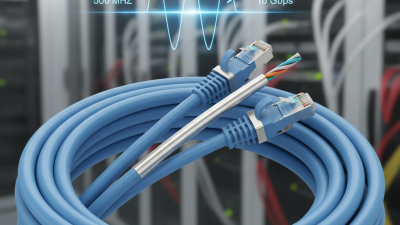
Cat 6A cables are twisted-pair copper cables designed for demanding Ethernet networks. They support speeds up to 10Gbps across distances reaching 100 meters. Their rated bandwidth can reach 500MHz, helping handle large file transfers, cloud applications, and high-resolution video streams.
Why does that matter? Cat 6A uses improved pair separation and tighter construction to reduce crosstalk. This matters in offices, server rooms, and homes with many active devices. Shielded versions can provide extra protection near electrical equipment. Unshielded versions are often easier to install and may suit ordinary indoor spaces. In real installations, cable quality is only part of the result. Poor terminations, sharp bends, and crowded pathways can still weaken performance.
Tips: Check the cable category, conductor material, jacket rating, and tested length. Solid copper conductors usually perform more consistently than copper-clad alternatives. Keep bends gentle and avoid pulling the cable too tightly. Use compatible connectors and patch panels. A cable tester can reveal wiring errors before they become confusing network problems. I have seen installation plans fail because the cable was excellent, but the connectors were poorly fitted. That detail is easy to overlook. Some advice also assumes perfect conditions, which rarely exist in older buildings. Measure the route carefully, leave modest service slack, and verify performance after installation.
When comparing Cat 6A cables, start with verified performance, not colorful packaging. ANSI/TIA-568.2-D and ISO/IEC 11801 specify 500 MHz operation for Cat 6A channels. IEEE 802.3an supports 10GBASE-T across a channel up to 100 meters. That distance includes patch cords, connectors, and permanent cabling. A cable marked “10Gbps” may still fail in a crowded rack if alien crosstalk is poorly controlled. Look for tested insertion loss, return loss, and crosstalk results. Certification reports matter more than marketing claims.
Construction also changes daily reliability. Solid copper conductors suit permanent links, while stranded conductors tolerate repeated patching better. Avoid copper-clad aluminum when stable resistance and long-term performance matter. Shielded designs can reduce interference near motors, power lines, or dense equipment, but they require proper grounding. Check the conductor gauge, bend radius, jacket rating, and connector compatibility. A thick cable may perform well, yet become frustrating inside a narrow cabinet. I have seen installations fail because installers ignored bend limits. That mistake is easy to repeat.
Tips: Choose cables with independent test documentation. Confirm whether the rating covers a link or a complete channel. Measure the route before ordering. Leave gentle service loops, not tight coils. Use field testing after installation; visual confidence is not enough. Also check local fire-rating requirements, since a technically excellent cable can still be unsuitable for its installation space.
Cat 6A cabling is designed for 10GBASE-T Ethernet and supports frequencies up to 500 MHz. A compliant installation can provide up to 100 meters of channel distance, including patch cords, while the permanent horizontal link is typically limited to 90 meters. Cat 6A cables use four twisted pairs with a nominal impedance of 100 ohms. When comparing cables, also check shielding, conductor type, jacket rating, bend flexibility, connector quality, and installation requirements.
Reference values are based on commonly specified Cat 6A performance requirements for structured cabling and 10GBASE-T networks.
Choosing the right Cat 6A cable depends on the network environment, not only the printed speed rating. A solid bare-copper cable suits permanent wall runs and can support 10Gbps Ethernet up to 100 meters under suitable installation conditions. A stranded patch cable works better between a switch, patch panel, and computer because it bends repeatedly without stressing fixed wiring. For electrically noisy rooms, a shielded Cat 6A cable can reduce interference from motors and power equipment. Ground it correctly, though. Poor grounding can create new problems.
A slim Cat 6A cable is useful for crowded racks and home offices where airflow and space matter.
It may be easier to route, but its smaller conductors can be less forgiving over long distances.
An outdoor-rated cable with a weather-resistant jacket fits cameras, access points, and detached buildings.
Direct-burial versions need proper depth and protection.
An unshielded cable is often practical for ordinary offices, bedrooms, and short indoor runs.
It usually costs less and installs more easily.
Finally, a snagless patch cable helps protect connectors in busy work areas, while a bulk cable gives installers flexibility for custom lengths.
Check the conductor material, jacket rating, bend radius, and independent test results before buying. Certification claims deserve verification. A cable can be labeled Cat 6A yet perform poorly when connectors, termination tools, or routing are mismatched. I have found that installation quality often matters more than small differences between cable designs. Avoid sharp bends and tight cable ties. Leave service loops. My own preference is not always the best one; dense racks may favor slim cables, while demanding industrial spaces need stronger shielding and mechanical protection.
Selecting the right Cat 6A cable starts with your network’s actual demands. Cat 6A supports 10Gbps transmission up to 100 meters when installed correctly. For a home office, a 15-meter cable may be enough. A warehouse or server room needs careful distance planning, routing, and testing.
Choose solid bare copper conductors for permanent wall runs. Avoid copper-clad aluminum, which can increase resistance and reduce reliability. Shielded cable helps near motors, fluorescent lighting, or heavy electrical equipment. Unshielded cable is often easier to install in ordinary rooms. Check the cable’s AWG rating, bend radius, jacket type, and temperature range before buying. Small details matter.
I have seen cables fail because installers pulled them too tightly around sharp corners. Keep gentle curves and avoid crushing the jacket under furniture. Use compatible keystone jacks and patch panels rated for Cat 6A. Poor connectors can limit an excellent cable. Test every completed run with a certified cable tester, not only a laptop connection. That extra check can reveal split pairs, excessive length, or grounding problems. I once trusted a basic continuity tester and missed performance issues; that shortcut was a mistake. For ceiling spaces, select a jacket approved for the building environment. Review local electrical requirements, too. Specification sheets are useful, but real installation conditions decide whether a cable performs well.
Reliable Cat 6A performance begins before the cable reaches the rack. IEEE 802.3an supports 10GBASE-T transmission across channels up to 100 meters. ANSI/TIA-568.2-D defines a 90-meter permanent link and a 100-meter channel. Keep each run below those limits. Leave service loops, but avoid tight coils. Respect the manufacturer’s stated bend radius. Excessive pulling can deform the pairs invisibly. I have seen clean-looking cables fail after being squeezed behind a patch panel.
Separate data cables from power lines whenever practical. Cross unavoidable power routes at right angles. Maintain pair twist close to each termination. A small untwisted section can weaken noise performance. Cat 6A is commonly rated to 500 MHz, so poor workmanship becomes easier to expose. The ISO/IEC 11801-1 channel model also emphasizes balanced cabling and controlled connection performance.
Test every installed link with a calibrated field certifier, not only a basic continuity tester. Record wire map, insertion loss, return loss, NEXT, and shield continuity where applicable. Use permanent-link adapters for permanent-link certification. Results should be saved with cable identifiers and outlet locations. Retest failed links after correcting one issue at a time. Do not simply repeat the test until it passes. That habit hides problems. Standards provide limits, but real rooms add heat, congestion, and movement. A final visual inspection still matters, especially around sharp tray edges and crowded cabinets.
| Rank | Cable Type / Best Use | Core Construction | Shielding | Key Specifications | Installation Tips | Testing Tips |
|---|---|---|---|---|---|---|
| 1 | Solid U/UTP Cat 6A Best overall choice for permanent in-wall runs |
Solid copper conductors, commonly 23 AWG | Unshielded | 100 Ω balanced cable; rated to 500 MHz; supports 10GBASE-T up to a 100 m channel when installed correctly | Keep the twist intact close to the termination; avoid tight bends and excessive pulling force | Use a permanent-link or channel test; verify wire map, insertion loss, return loss, NEXT and length |
| 2 | Solid F/UTP Cat 6A Best for areas with moderate electromagnetic noise |
Solid copper conductors with an overall foil shield | Overall foil shield; pairs are typically unshielded | 500 MHz performance; 100 Ω impedance; requires compatible shielded hardware and bonding for the shield to be effective | Maintain shield continuity through jacks, patch panels and patch cords; separate from high-voltage wiring | Run standard Cat 6A certification tests and inspect shield continuity and bonding where applicable |
| 3 | Solid S/FTP Cat 6A Best for industrial rooms and high-noise environments |
Solid copper conductors with individual pair shields and an overall braid | Individually foil-shielded pairs plus an overall braid | High protection against alien crosstalk and external interference; generally larger and less flexible than unshielded cable | Use properly bonded shielded connectors; observe the cable bend radius and avoid crushing the braid | Check shield continuity at both ends and perform full field certification rather than relying only on a basic wire-map tester |
| 4 | Low-Smoke Zero-Halogen Cat 6A Best for enclosed public and transportation spaces |
Solid copper conductors with a low-smoke, halogen-free jacket | Available in unshielded or shielded constructions | Cat 6A electrical performance to 500 MHz; jacket fire and smoke ratings depend on the specific cable construction | Confirm that the jacket rating meets local codes and the building specification before installation | Test the installed link after termination; record cable type, length, test limit and margin for each outlet |
| 5 | Plenum-Rated Cat 6A Best for air-handling spaces |
Solid copper conductors with a plenum-rated jacket | Available in unshielded or shielded constructions | 500 MHz Cat 6A performance; plenum fire rating is a safety classification and does not itself increase network speed | Use only where the required building code calls for a plenum-rated cable; do not substitute jacket ratings without approval | Use the correct Cat 6A test standard and confirm that connectors and patch cords are also suitable for the intended link |
| 6 | Outdoor-Rated Cat 6A Best for protected exterior pathways |
Solid copper conductors with a weather-resistant jacket; some designs include water-blocking material | Shielding varies by construction | Cat 6A bandwidth up to 500 MHz; outdoor, UV and water-resistance ratings must be confirmed separately from the category rating | Use conduit or approved pathway protection; provide grounding and surge protection where required; avoid direct burial unless specifically rated | Test before and after pathway installation; check for moisture ingress, insulation damage and increased insertion loss |
| 7 | Stranded Cat 6A Patch Cable Best for equipment racks and short flexible connections |
Stranded copper conductors with factory-installed modular plugs or field-terminated connectors | Available in unshielded or shielded constructions | Designed for flexible patching; contributes to the maximum 100 m channel and normally occupies part of the 10 m patch-cord allowance | Do not use stranded patch cable for long permanent runs; keep patch cords short, undamaged and free from sharp bends | Use a channel test when patch cords are included; verify plug contact quality and link negotiation at 10 Gb/s where supported |