Choosing an unshielded twisted-pair cable is not just a matter of picking the highest category number. The right choice depends on speed, distance, installation conditions, and the equipment at each end. A cable running through a quiet home office faces different demands from one serving a busy commercial network.
Cabling educator James W. Hayes is known for his work explaining network cabling. To avoid presenting an unverified sentence as his exact words, here is a paraphrased principle: “Match the cable category to the application, then verify the installation.” That distinction matters. A high-category cable cannot fix a poor termination, a damaged jacket, or a link that exceeds its rated length.
This guide compares ten categories commonly discussed alongside UTP cable, from older Cat1 and Cat2 examples to Cat8. Some are obsolete or uncommon, while others suit modern Ethernet links. The labels can also mislead: Cat7 and Cat7A products are often shielded, so check the actual construction before calling them UTP. Look for the category marking printed along the cable, then compare its rated performance with your network needs. Small details count. A sharp bend behind a desk can matter more than a premium label. The overview that follows highlights practical uses, limitations, and selection points, while recognizing that product specifications and standards should be checked before purchase.
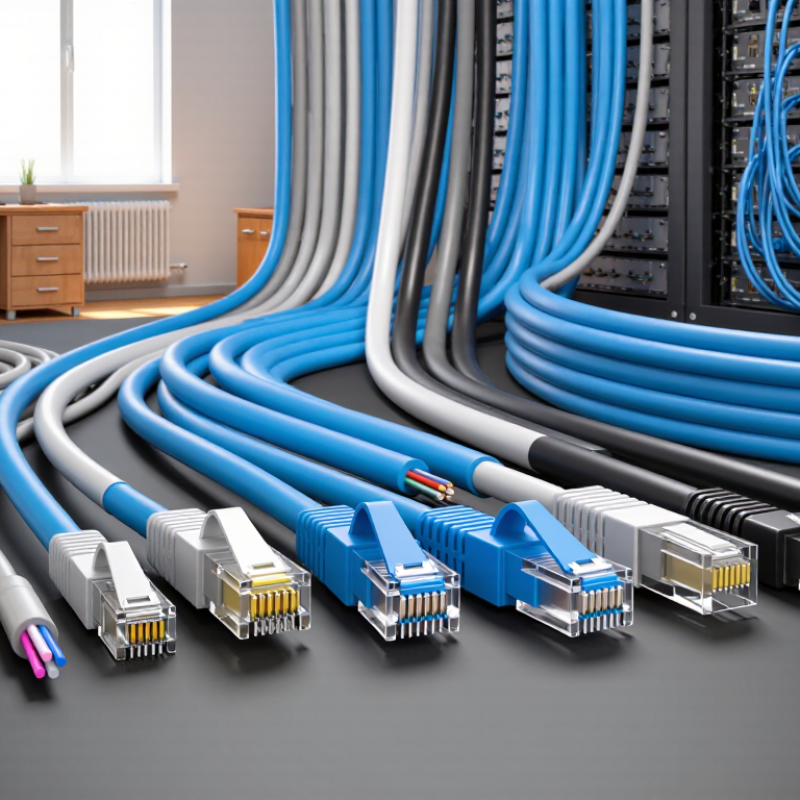
UTP means unshielded twisted pair: four color-coded copper pairs sit beneath an outer jacket, with no foil or braided screen. The twists help reduce crosstalk and keep the cable flexible around corners. Look closely at a cut end. There is no metal layer to bond. Installation still matters: tight bends, crushed sections, or excessive untwisting near a jack can weaken measured performance.
ISO/IEC 11801 uses the notation U/UTP: the first letter describes the overall screen, and the second describes pair screening. For U/UTP, both are unshielded. TIA-568.2-D lists familiar category frequency ratings. Cat 5e is rated at 100 MHz, Cat 6 at 250 MHz, and Cat 6A at 500 MHz. These ratings do not guarantee a particular data rate. IEEE 802.3an specifies 10GBASE-T at up to 100 meters over Cat 6A channels. Cat 6 may support 10 Gb/s over shorter runs, commonly up to 55 meters; results depend on installation and crosstalk conditions (IEEE 802.3an; TIA-568.2-D). That caveat is easy to miss. Category labels help, but the installed link must pass the relevant test.
UTP means unshielded twisted pair: insulated copper wire pairs twisted together to reduce interference. Cable categories differ in bandwidth, supported data rates, and practical reach. The names are not perfectly intuitive. Cat1 and Cat2 are legacy voice or low-speed data cables, rated historically for voice and up to 4 Mbps, respectively.
Cat3 supports 10 Mbps at 16 MHz; it may still appear in older telephone wiring. Cat4 reached 16 Mbps at 20 MHz, but is now uncommon. Cat5 runs at 100 MHz and typically supports 100 Mbps Ethernet. Cat5e keeps the 100 MHz rating while supporting gigabit Ethernet. Cat6 is rated to 250 MHz, with 10 Gbps possible over shorter runs, commonly up to 55 meters. Cat6A reaches 500 MHz and supports 10 Gbps up to 100 meters. Cat7 is rated to 600 MHz and 10 Gbps, but standard versions use shielding, so it is not strictly UTP. Cat8 is rated to 2,000 MHz and supports 25 or 40 Gbps over up to 30 meters; it also uses shielding.
For a typical office or home, Cat5e and Cat6 often meet gigabit needs. Cat6A can help with longer 10-gigabit links. Real performance also depends on installation quality, connectors, and nearby electrical noise. A kinked cable can undermine its rating. Check the full channel specification, not just the label on the jacket.
UTP cable categories differ in usable speed, bandwidth, and reach. The figures below describe common Ethernet use; actual performance depends on installation quality and connected equipment. Cat1 carried voice, while Cat2 supported older networks at about 4 Mbps. Neither is a practical Ethernet choice today. Cat3 supports 10 Mbps over runs up to 100 meters, and Cat4 reached 16 Mbps. Cat5 provides up to 100 Mbps, also typically across 100 meters.
Cat5e supports 1 Gbps at 100 meters, making it a common baseline for basic office networks. Cat6 offers 250 MHz bandwidth and 1 Gbps over 100 meters; 10 Gbps may work over shorter runs, often up to 55 meters. Cat6a raises bandwidth to 500 MHz and supports 10 Gbps across 100 meters. That extra margin can help where several cables share a busy conduit. Not always needed.
Cat7 is commonly rated for 600 MHz and 10 Gbps, but recognized Cat7 cable designs use shielding, so it is not strictly UTP. Cat8 is shielded too, with bandwidth up to 2,000 MHz and 25 or 40 Gbps over roughly 30 meters. Its short reach suits data-center links, not long building runs. For a typical room-to-switch connection, Cat5e or Cat6 may be enough; choosing a higher category without checking distance and equipment can add cost without improving actual throughput.
UTP cable categories fit different network jobs, from basic voice lines to fast office connections. Cat1 and Cat2 are legacy types, once used for telephone wiring and early data networks. Cat3 supported voice systems and 10 Mbps Ethernet, while Cat4 appeared in older Token Ring networks. Cat5 carried 100 Mbps Ethernet in offices and homes. Cat5e reduced crosstalk and became a practical choice for Gigabit Ethernet, such as connecting a desktop to a nearby router.
Mostly legacy gear. These older categories are rarely sensible choices for new installations.
Cat6 is common in homes and small offices, supporting Gigabit Ethernet and some 10 Gigabit links over shorter runs. Cat6a is better suited to 10 Gigabit Ethernet across longer building runs, including links between network cabinets and work areas. Cat7 is often marketed for high-speed networking, but it typically uses shielding and is not standard UTP. Cat8 is also generally shielded, serving short, high-speed data-center connections rather than typical household wiring.
A common mistake is choosing a category by its number alone. Check the cable’s construction, installed distance, and equipment requirements; a thicker, less flexible cable can be awkward in tight wall spaces.
Choosing the right UTP cable starts with the network’s actual needs, not the highest category on the shelf. Cat5e can support gigabit Ethernet over standard channel distances, while Cat6 offers more headroom for many office networks. Cat6A supports 10-gigabit Ethernet over longer runs, up to 100 metres when installed correctly. Distance matters.
Think about where the cable will run. A cable passing near fluorescent lights, motors, or dense bundles may face more interference, even though UTP has no shielding. Careful routing and proper termination help reduce problems. For permanent in-wall links, solid-core cable is generally suitable; stranded cable bends more easily and is often used for short patch leads. Check the required fire rating for the building space, too.
Power over Ethernet can affect the choice, especially when many cameras or access points share a cable bundle. Confirm that the cable category and conductor size suit the equipment and installation conditions. Cat6A may be worthwhile for new runs expected to carry heavier traffic, but it costs more and can be thicker to route. Not always necessary. Measure the path, check device speeds and connector compatibility, then test the finished links. I would still leave room for future upgrades; predicting every need is difficult.
| Cable Category | Bandwidth Rating | Typical Data Rate and Reach | Common Use | UTP Availability | Choosing Guidance |
|---|---|---|---|---|---|
| Category 1 (Cat 1) | No modern structured-cabling rating | No standardized Ethernet data rate | Legacy analog telephone wiring | Historical unshielded telephone wiring; not a current Ethernet cabling category | Do not select for a new network installation. |
| Category 2 (Cat 2) | About 1 MHz in historical specifications | Historically associated with data rates up to 4 Mbps | Legacy voice and early data networks | Obsolete; not suitable for modern Ethernet structured cabling | Replace it rather than reusing it for current network links. |
| Category 3 (Cat 3) | 16 MHz | 10 Mbps Ethernet over channels up to 100 m | Legacy 10BASE-T and telephone systems | Unshielded versions exist | Suitable only for legacy systems; upgrade for modern devices. |
| Category 4 (Cat 4) | 20 MHz | Historically used for data rates up to 16 Mbps | Legacy Token Ring networks | Obsolete and rarely encountered in current installations | Not recommended for new or upgraded Ethernet networks. |
| Category 5 (Cat 5) | 100 MHz | Commonly used for 100 Mbps Ethernet over channels up to 100 m | Older Fast Ethernet installations | Unshielded versions exist; largely superseded by Cat 5e | Choose Cat 5e or higher for a new installation. |
| Category 5e (Cat 5e) | 100 MHz | 1 Gbps Ethernet over channels up to 100 m | Home networks, offices, and general-purpose LANs | Widely available as UTP | A practical option for standard gigabit networks and moderate budgets. |
| Category 6 (Cat 6) | 250 MHz | 1 Gbps up to 100 m; 10 Gbps may be supported over shorter runs, typically up to 55 m depending on installation conditions | Office LANs, home wiring, and higher-performance access links | Widely available as UTP | Choose it for extra capacity over Cat 5e; verify the required reach for 10 Gbps. |
| Category 6A (Cat 6A) | 500 MHz | 10 Gbps Ethernet over channels up to 100 m | High-speed office networks, data-intensive work areas, and PoE installations | UTP versions are available; cable is typically thicker than Cat 6 | A strong choice when 10 Gbps at the full channel length is required. |
| Category 7 (Cat 7 / Class F) | Up to 600 MHz under ISO/IEC Class F specifications | Designed for 10 Gbps Ethernet up to 100 m in compliant systems | Specialized installations using compatible Class F components | The recognized Class F system uses shielding; it is not a standard TIA UTP category. | For ordinary unshielded Ethernet cabling, consider Cat 6A instead. |
| Category 8 (Cat 8 / Class I or II) | Up to 2,000 MHz | 25 or 40 Gbps Ethernet for channels up to 30 m, depending on the system | Short data-center links between switches and servers | Cat 8 cabling is shielded; it is not UTP. | Use only where short-reach 25/40 Gbps links are needed; it is generally unnecessary for homes or typical offices. |