Choosing the right cable is a practical decision, not just a shopping detail. A Cat 6 bulk cable installation can support Gigabit Ethernet over channels up to 100 meters, when correctly installed and terminated. It can also carry 10-Gigabit Ethernet over shorter distances, commonly up to 55 meters, depending on the cabling environment. That makes it useful for office runs, patch panels, and home networks where devices may change over time.
The demand for dependable connections is clear. Cisco’s Annual Internet Report forecast 29.3 billion networked devices by 2023; this is a historical forecast, not a current device count. More connected equipment means more pressure on network infrastructure. Ethernet’s co-inventor Bob Metcalfe is associated with the observation, “The value of a network is proportional to the square of the number of connected users.” His point concerns network growth, but it also highlights why the physical links beneath that growth matter.
Still, buying Cat 6 does not guarantee a faster network. The router, switches, device ports, terminations, and installation quality all matter. A poorly crimped connector can undermine a premium cable run. One detail is easy to miss. Bulk cable also gives installers control over run length and termination, but it requires suitable connectors and careful work. This guide explains when Cat 6 is a sensible choice, what its specifications mean in practice, and where its limits deserve a closer look.
Cat 6 bulk cable is an un-terminated cable supplied on a reel or in a box. It typically contains four twisted copper pairs, which installers cut to length and terminate with compatible jacks. The twists help reduce electromagnetic noise and crosstalk. Data travels as changing electrical signals, and the receiver reads the difference between the two wires in each pair. Keep the twists close to the termination. Small details matter.
The key rating is 250 MHz. ANSI/TIA-568.2-D sets Cat 6 performance requirements through that frequency. IEEE 802.3ab specifies 1000BASE-T Gigabit Ethernet over four pairs for channels up to 100 meters. That matters. Cat 6 may support 10-Gigabit Ethernet over shorter runs, but reach depends on installation conditions and crosstalk. It is not a dependable 100-meter 10G promise; Cat 6A is the more suitable standard for that distance.
Bulk cable works well for routes through ceilings, walls, and equipment rooms, where each run can be cut to fit. After installation, a certifier can test length, wire mapping, signal loss, and crosstalk against channel limits. Not magic. A tight bend behind a cabinet or excessive untwisting can compromise performance. The specification is useful, but the finished link needs testing.
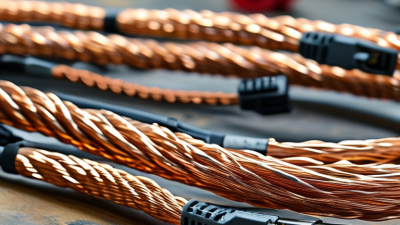
Cable design shapes performance long before a device connects. Cat 6 uses tightly twisted copper pairs to reduce interference between signals. Many designs also include a separator that limits pair-to-pair crosstalk.
The details matter. ANSI/TIA-568.2-D specifies Cat 6 performance to 250 MHz, but that rating alone cannot guarantee a clean installation. Poorly matched connectors, sharp bends, or crushed cable can weaken the link. I have seen tidy-looking runs fail certification after tight bends near a patch panel.
IEEE 802.3 defines 1000BASE-T operation over channels up to 100 meters, a useful benchmark for office cabling. For 10GBASE-T, Cat 6 may support runs up to 55 meters, depending on installation conditions and alien crosstalk.
That limit is easy to overlook. Cable bundles packed tightly through a ceiling can pick up interference from neighboring runs. Solid conductors suit permanent in-wall links; stranded cable is more flexible for patch cords, but the two are not interchangeable in every termination.
Buying bulk cable also means the installer controls the cuts and routing, which helps reduce excess slack. Yet mistakes multiply across a long run. Test the completed channel, not just the cable spool.
Cat 6 bulk cable gives installers flexibility to build permanent links around a floor plan, rather than relying on fixed-length patch cords. ANSI/TIA-568.2-D specifies Category 6 performance to 250 MHz, supporting common voice, data, and video applications on one structured cabling system. For a typical channel, the standard permits up to 100 meters, including patch cords. That reach helps connect a wiring closet to desks, access points, and cameras without adding intermediate switches. Small details matter: keep cable away from power lines, respect bend limits, and label both ends.
The headroom is useful, but it has limits. IEEE 802.3an defines 10GBASE-T, while TIA guidance on 10GBASE-T over installed Category 6 cabling addresses alien crosstalk and channel conditions. In practice, 10-gigabit operation over Cat 6 is commonly limited to roughly 55 meters; it is not a guaranteed 100-meter upgrade. For longer 10-gigabit runs, Category 6A may be the safer specification. Check the actual pathway and test completed links.
Bulk cable also supports consistent, serviceable layouts. A technician can pull measured runs, terminate them at a patch panel, and replace a damaged link without disturbing neighboring circuits. Solid conductors are generally suited to permanent horizontal runs, while stranded patch cords handle repeated movement. There is a trade-off: bulk cable demands careful termination and certification testing. A neat rack can still hide a poor link. A flawed assumption? More bandwidth on paper does not fix bad installation.
| Dimension | Cat 6 Cable Detail | Practical Benefit |
|---|---|---|
| Rated bandwidth | Cat 6 is specified for frequencies up to 250 MHz. | Provides more bandwidth than Cat 5e for supported network applications and helps accommodate changing connectivity needs. |
| Gigabit Ethernet distance | Supports 1 Gigabit Ethernet over a channel up to 100 m when the complete cabling channel meets applicable requirements. | Suitable for many office, school, and residential horizontal cabling runs. |
| 10 Gigabit Ethernet distance | May support 10 Gigabit Ethernet on Cat 6 channels up to approximately 55 m, depending on installation conditions and alien crosstalk performance. | Can serve some shorter high-speed links; Cat 6A is generally specified for 10 Gigabit Ethernet channels up to 100 m. |
| Channel and permanent-link lengths | A typical standards-based channel limit is 100 m, commonly consisting of up to 90 m of permanent link plus patch cords. | Bulk cable allows installers to cut runs to suit the layout while planning within established channel limits. |
| Pair construction | Four twisted pairs help reduce electromagnetic interference and crosstalk. Cable designs and separators vary by product. | Supports dependable data transmission when the cable is correctly terminated and installed without excessive untwisting or damage. |
| Bulk installation format | Supplied as continuous cable on a reel or pull box, rather than as fixed-length patch cords. | Enables custom-length permanent runs through walls, ceilings, conduits, and cable pathways, potentially reducing excess cable and connections. |
| Power over Ethernet | Can be used in PoE installations when the cable, connectors, bundle size, temperature, and installation method are suitable for the application. | One cable run can carry data and power to compatible devices such as access points, cameras, and VoIP phones. Verify the cable’s ratings and installation conditions. |
| Unshielded or shielded construction | Cat 6 is available in unshielded and shielded designs; shielding requirements depend on the cable and system design. | Allows selection based on the installation environment. Shielded systems require compatible components and proper bonding to work as intended. |
| Installation quality | Performance depends on the entire channel, including cable, connectors, termination, routing, and compliance with bend-radius and pulling limits. | Careful installation and certification testing help ensure the completed link meets its intended performance level. |
Cat 6 bulk cable suits homes where several rooms need stable wired connections. Run it from a central router or switch to desks, televisions, and ceiling-mounted access points. The International Telecommunication Union’s Facts and Figures 2023 estimated that 5.4 billion people were online, showing how widely everyday life now depends on connected services. In a busy home, wired links can help desktop computers and gaming consoles avoid competing for wireless airtime. Small details matter.
For offices, bulk cable makes structured wiring practical across workstations, meeting rooms, printers, and security cameras. Category 6 supports 1-gigabit Ethernet over channels up to 100 meters; 10-gigabit operation is generally limited to shorter runs, around 55 meters, depending on installation conditions. These figures align with telecommunications cabling standards. They are not a promise of actual speed: switches, endpoints, termination quality, and interference all matter. A neatly labeled run is easier to troubleshoot than a mystery cable above a ceiling.
For renovations or new builds, buy only the length needed and leave a little service slack at each outlet. Avoid sharp bends and tight cable ties, which can affect performance. I would not oversell it. Cat 6 is a useful, flexible choice, but it may be unnecessary for a short link with modest demands. A site survey can reveal where wired connections will make the biggest difference.
How to Choose and Install Cat 6 Bulk Cable
Choose cable based on the distance, environment, and network speed you actually need. Cat 6 supports bandwidth up to 250 MHz under the ANSI/TIA-568.2-D standard. It can carry 10-gigabit Ethernet for shorter runs, typically up to 55 meters, depending on installation conditions. For longer 10-gigabit links, consider Cat 6A instead. Check the cable’s conductor material and jacket rating; solid copper is generally suitable for permanent in-wall runs, while copper-clad aluminum can create performance and termination problems. One detail is easy to overlook.
Before buying a bulk spool, measure each route and allow extra length for service loops and clean terminations. Keep data cable away from power wiring where practical, and avoid tight bends or crushing it beneath staples. A kink may not show from the outside. Use compatible keystone jacks and plugs, then terminate to the same wiring scheme at both ends. The IEEE 802.3an standard defines 10GBASE-T, but actual performance depends on the full cabling channel, not just the cable label.
During installation, label both ends before closing walls or ceilings. Test every completed run with a suitable cable certifier, especially if the network will carry high-speed traffic. A basic continuity tester can find broken pairs, but it cannot confirm full Cat 6 performance. I would still inspect the routing afterward; a tidy installation can hide a poor bend or loose termination.
Rated bandwidth by cable category
Cat 6 is rated to 250 MHz, offering more bandwidth than Cat 5e at 100 MHz. Bulk cable lets you cut runs to the lengths your installation needs. A Cat 6 channel can support 1 Gbps up to 100 m; 10 Gbps may be supported up to approximately 55 m, depending on installation and crosstalk. Keep the full channel within the applicable distance limits and terminate the cable correctly.